
Building An Indie App Business #76
Read Everything About My New App Project

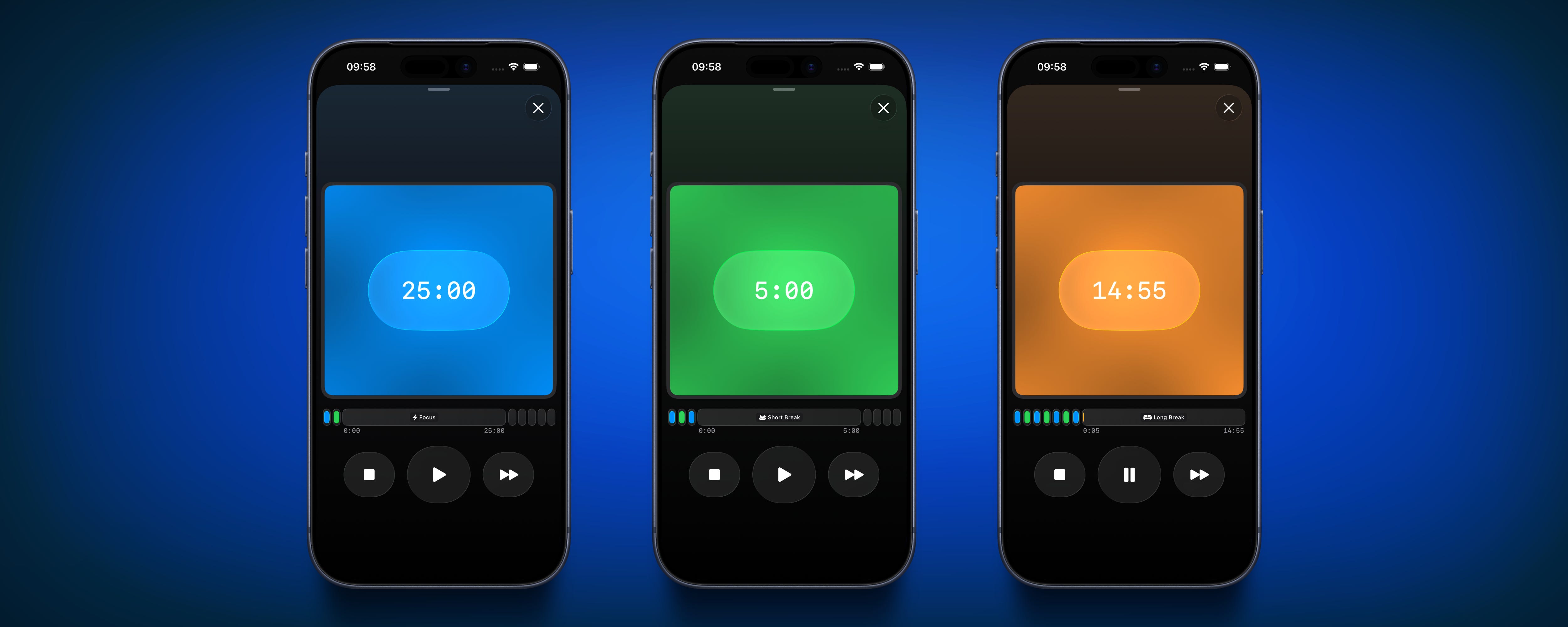
In the last couple of weeks, I have been fully focused on building a new app project. I decided to work on a simple and clean Focus Timer (Pomodoro) app because I want to help people live a more focused and meaningful life. My goal is to keep the app minimal, so it’s easy to use and not distracting. I thought I would share some of my thoughts and the progress I made so far on this project.
Just a short intermission before we talk about the new app: I am really happy to share that this blog just reached 1,000 subscribers! When I started writing these weekly logs, I never thought so many people would be interested in following my indie app journey. It means a lot to me to know that there are people out there who enjoy reading my updates and support what I am doing. Thank you so much to everyone who subscribed, commented, or shared my posts. This gives me even more motivation to keep building and sharing everything I learn along the way.
Why did I start this new app project?
One of the main reasons I started this new app project is because I really want to learn SwiftUI and get better at native iOS development. My goal is to make the app feel as native as possible and take advantage of all the cool features that iOS offers. For example, I want to add widgets for the home screen, lock screen, and also support the dynamic island. I think these features can make the app much more useful and fun to use. Besides that, I am also excited to try out other native iOS features like integrating with iOS Shortcuts, so users can start a focus session with just a tap or even with their voice. If I have enough time, I would love to experiment with the new Apple Intelligence features and maybe use them to automatically tag focus sessions with a fitting topic. All of this is new to me, but I think it will be a great learning experience.
Lately, I have been thinking a lot about how to keep my build-in-public journey interesting while still supporting my main app, HabitKit, for the long run. It’s not always easy to find the right balance. I got some feedback recently that my updates can feel a bit boring sometimes, and honestly, I understand where that comes from. When you are working on a project that is already successful, most of the changes are just small improvements or bug fixes. These micro-optimizations are important, but they are not always exciting to talk about. It’s normal that the content gets a bit repetitive when you are just polishing things instead of launching big new features. This new app project is a great opportunity to keep things fresh and engaging!
Current Progress / State of the App
I started this project by thinking about which features I want to have in the app. To keep everything organized, I made a Notion database where I wrote down all the features and work items I need to finish for version 1.0. Over the last few months, I tried out many of the most popular Pomodoro timer apps, but honestly, none of them really fit what I was looking for. This is always a big sign for me that it’s worth building something new. I had the same feeling when I started HabitKit, after searching for a good habit-tracking app for a long time and not finding the right one. With this new app I have a clear idea in my head about how it should work and what features are important to me. This makes it much easier to plan and stay motivated.
One of the biggest tasks in this project was figuring out how to store the data in the app. This is actually something I really enjoy about working with native iOS technologies. Apple recommends using SwiftData as the database, so I just followed their advice. So far, I have to say it’s been a really good experience. SwiftData is easy to use and makes a lot of things simple. I did read some scary stories online about problems with the framework, but for now, everything works well for me and I hope it stays that way.
The best thing about using SwiftData is how simple it is to set up iCloud sync between devices. With other tools, it’s always a pain to find a good and cheap way to sync data, but here it just works out of the box. I already created all the models I need for the app and even built a small debug screen. On this screen, I can see what data is currently saved, and I added some buttons to quickly delete everything or add some test data. This helps a lot while developing and testing new features.
One thing I really enjoy about working with SwiftUI is how simple it is to make a nice-looking design, especially with the new Liquid Glass style. The navigation components, page transitions, tab bars, and buttons all look great right out of the box and are very easy to use. Honestly, it feels almost impossible to make something that looks bad with these tools. Even as someone who is not a professional designer, I can get a modern and beautiful result without much effort, which makes building the app a lot more fun.
After I finished the basic “start/stop session” functionality, I decided to put the first version of the “walking skeleton” on my phone and actually use it while I keep building. I did the same thing when I was working on HabitKit, and I really like this approach. It helps me to get a real feeling for the user experience and quickly notice what feels good and what needs to be improved. Using the app myself from the very beginning makes it much easier to spot small problems or ideas for new features, and it keeps me motivated to make the app better step by step.
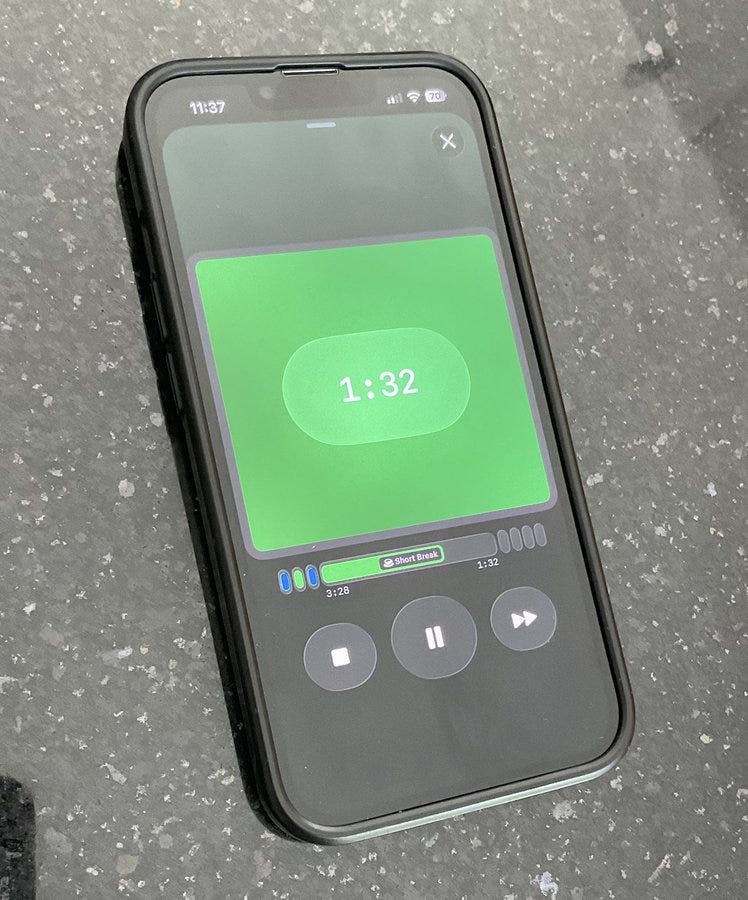
I also started working on Live Activities for the Dynamic Island and the lock screen, because I think this is a really important feature for a Focus Timer app. With this, users can lock their phone and still see the timer progress without having to open the app again and again. I was a bit worried at first that it would be complicated to implement, but actually, it went much smoother than I expected. I’m really happy that I got this feature working so quickly, and I think it will make the app much more useful for everyone.
What’s to come:
Here are some things I still need to do:
First, I need to do a lot of polishing for the screens I already built. Right now, I focused more on getting the main features working, so the design is still a bit rough. I want to make everything look nicer and feel smoother before the first release.
History Screen: I want to add a screen where users can swipe through a calendar and see all their finished focus sessions. I think it’s really motivating to look back and see your progress over time.
Statistics Screen: I plan to make a statistics page, probably as a Pro feature. Here, users can see some cool stats and insights about their focus sessions, like how many sessions they did, their longest streak, and maybe some charts.
Paywall: Of course, I need to add some way to make money with the app. I want to try using a ready-made paywall from RevenueCat, so I don’t have to design everything myself. I’m curious how well this will work and how easy it is to set up.
Other things: There are also a lot of small but important tasks, like doing ASO research, buying a domain, setting up social media accounts, adding Crashlytics for error tracking, making App Store screenshots, and building a simple onboarding for new users. All these things take time but are needed for a good launch.
There is still a long list of things I need to do, but I’m really excited about this app and can’t wait to keep working on it. I hope you are also looking forward to seeing how it turns out! I will build everything in public and share all my progress, the good and the bad, so you can follow along with every step of the journey.
Don't ever think your newsletter / blog is boring. Only a boring person would say that. Keep up the great work!
Great work Sebastian for 1K sub and a new born app. Hope your app is on Appstore soon to use it.
I have never thought of become a Swift Developer, but you said its quite fancy. May have a try :).